Stripboard Builder – Interactive Guide
I can...
- Say what each of the three boards does.
- Find key parts on a stripboard.
- Match wires and colours to the schematic.
- Spot and fix common wiring mistakes.
What this page is for
This page helps you build your stripboard safely and correctly. Each tab shows one part of the system. Open the sections to learn how things work and what to check.
How to use this page
- Start with the Overview tab to learn the full system.
- Go to Input, Process or Output when you build that board.
- Open the dropdowns one at a time.
- Follow the colour codes to avoid mistakes.
- Use the photos to match your work.
- Read the checkpoints to test your build.
- Fix any mistakes before moving on.
- Go back and re-check if something doesn’t work.
- Take your time — small steps make better builds.
System Overview
A complete guide to understanding your three-board system.
🛠 Build Method — Universal 6-Step Stripboard Process
These six steps work for ANY stripboard project: Input → Process → Output.
Universal 6-Step Method
- Print the schematic and highlight inputs, outputs, and power pins.
- Mark the power rails.
Red = +V (top) / Black = 0V (bottom) - Place the IC first.
Stripboard needs track cuts under each pin. - Add resistors and sensors.
Ensure correct electrical nodes. - Add link wires.
If strips don’t touch → you MUST add a wire. - Add LEDs and capacitors last.
Check polarity.
Rule: Follow the schematic, not the picture.
🎨 Stripboard Colour Code (N5 Standard)
Use a unique colour for each signal.
- RED = +V
- BLACK = 0V
- Blue = TempOut
- Green = SwitchOut
- Yellow = AND output
- Purple = timing node
This prevents mistakes and improves debugging speed.
🖼 System Images — Complete Input → Process → Output
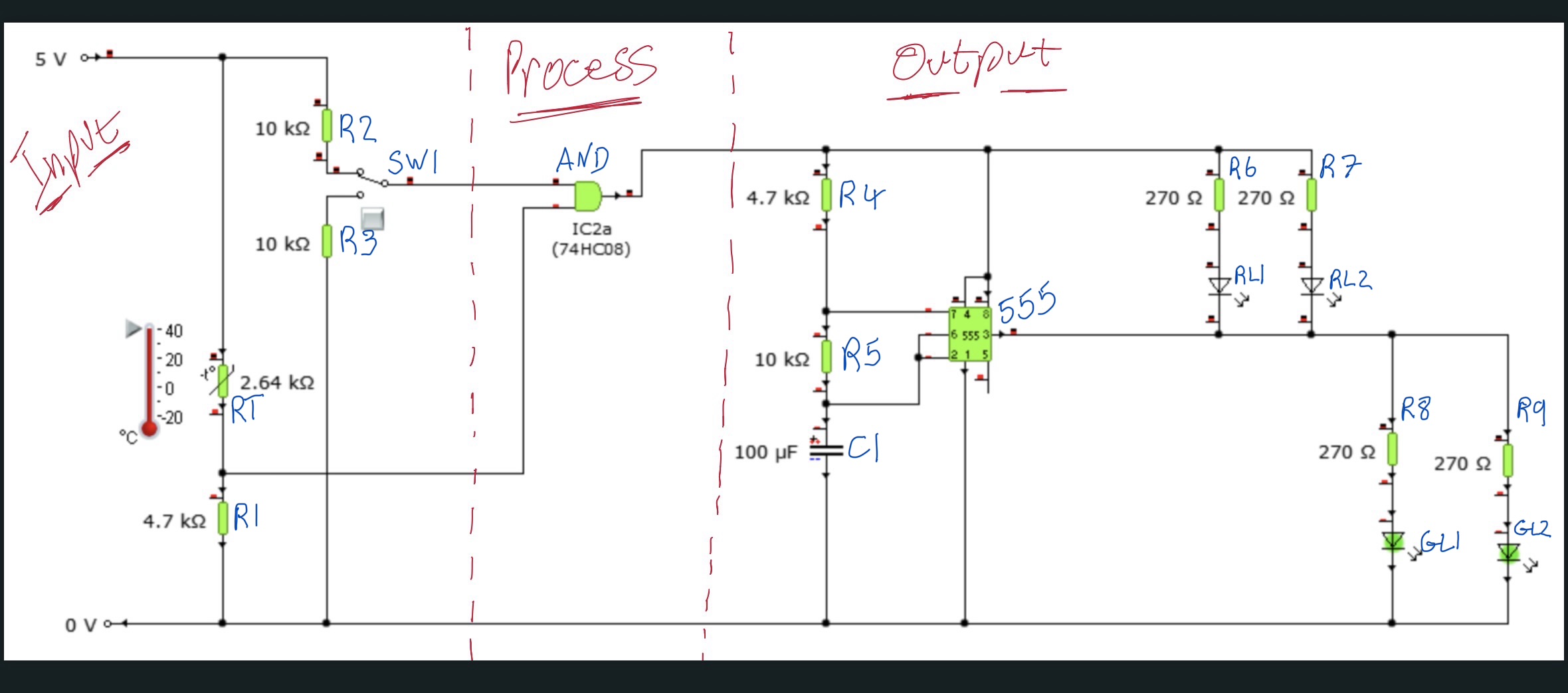
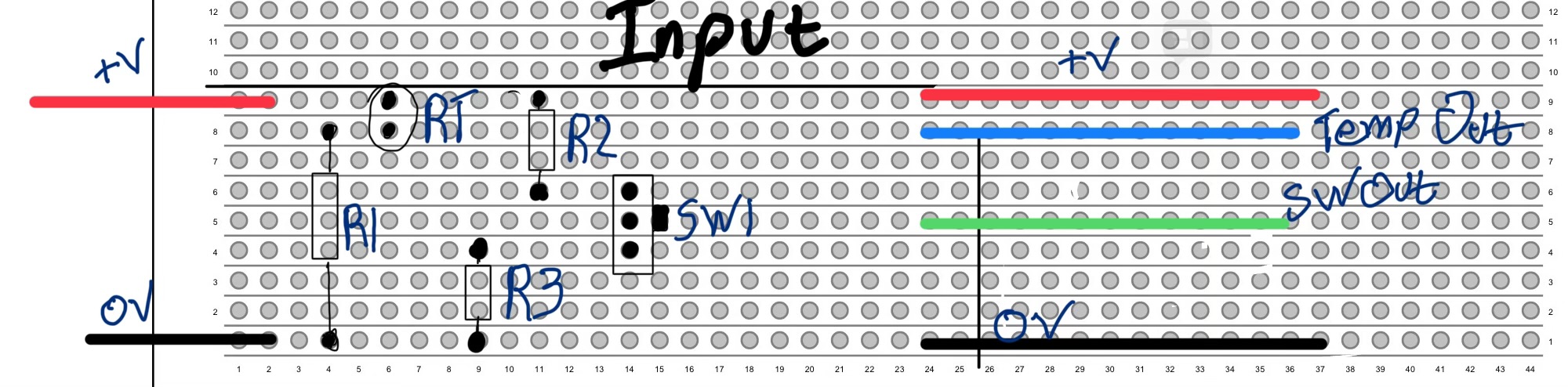
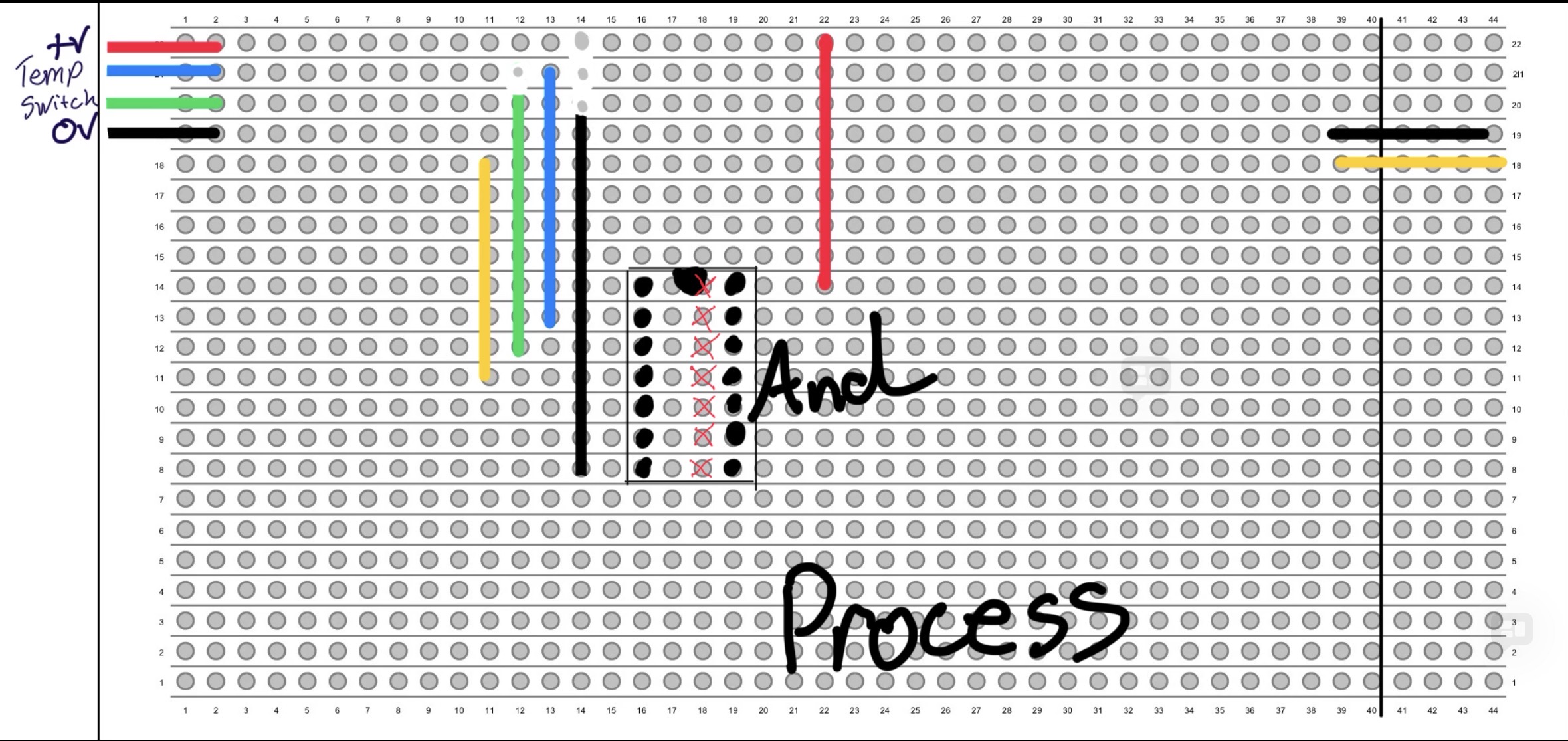
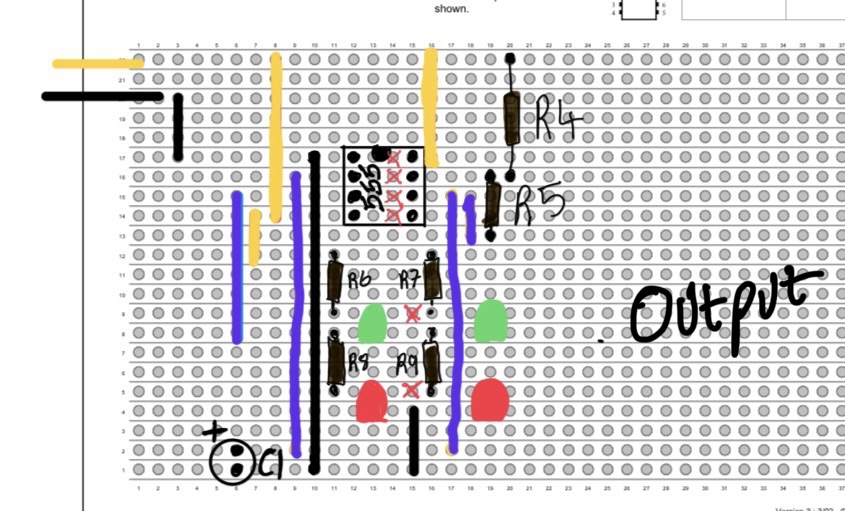
🧩 System Summary — What Each Board Does
Input board: generates TempOut & SwitchOut
Process board: AND gate decision
Output board: 555 astable LED flasher
Boards may look different from the schematic, but the connections must always match the diagram.
🔧 Troubleshooting Checklist
- Rails continuous end-to-end?
- All IC pins isolated?
- Unique colour per signal?
- Capacitor polarity correct?
- LED polarity correct?
- Do connections match the schematic?
If stuck → continuity-test each strip. Follow the copper, not your eyes.
🔄 Schematic → Stripboard Translation Rules
Understanding how a schematic becomes a physical stripboard layout is a key N5 Electronics skill.
Key Rules
- Schematic diagrams show logical connections — not physical position.
- Every “node” in the schematic must be a single connected copper strip.
- If the strips don’t touch but the schematic shows a connection → add a link wire.
- Track cuts isolate pins and replicate the centre gap of a breadboard.
- Always follow IC pin numbers — not the picture.
Pedagogy: This section corrects the biggest misconception: “stripboard must look like the schematic picture”.
🛠 Student Task: Build Your Own Variant
Choose ONE of these challenges and design your own stripboard layout. Use the colour code, follow the build steps, and check every connection.
Design Brief Options
- Add a second switch to create an OR input.
- Replace the thermistor with an LDR for a light-controlled system.
- Convert the 555 astable into a monostable circuit.
- Add a transistor driver so the system powers a buzzer or motor.
Pedagogy: Encourages independent problem-solving and prepares learners for “design from a brief” tasks.
⚙ Advanced: Optimising Stripboard Layouts
Once your stripboard works, improve it using professional layout techniques.
Optimisation Techniques
- Keep wires short and tidy — improves debug speed.
- Use symmetry where possible.
- Group colours by signal type.
- Minimise the number of track cuts.
- Avoid loops in 0V rails.
Pedagogy: Builds skills useful for Higher Electronics and PCB design.
I can...
- Explain what TempOut and SwitchOut do.
- Build the thermistor and switch dividers correctly.
- Use colour coding to follow each signal.
- Check my work for common mistakes.
Input Board
🧩 What the Input Board Does
The Input board creates two clean logic signals: TempOut (blue) and SwitchOut (green).
🔧 Components & Wiring
- RT — Thermistor
- R1 — 4.7 kΩ pulldown
- R2 — 10 kΩ pull-up
- R3 — 10 kΩ pulldown
- SW1 — Switch
- +V rail — top copper strip
- 0V rail — bottom copper strip
Colour coding: Blue = TempOut Green = SwitchOut Red = +V, Black = 0V
🌡 Temp & Switch Dividers
Thermistor divider
RT (to +V) and R1 (to 0V) form a voltage divider. Higher temperature → lower RT → higher TempOut.
Switch divider
- R2 pulls SwitchOut HIGH
- R3 pulls SwitchOut LOW
- SW1 drives the centre pin
✔ Build Checkpoint & Mistakes
Build Checkpoint
- TempOut changes when the thermistor warms/cools?
- SwitchOut clearly switches HIGH/LOW?
- Correct divider wiring?
- Colours not reused?
Common Mistakes
- Thermistor wired to 0V instead of +V
- Switch centre pin on wrong strip
- R2/R3 swapped
- Colours reused → impossible to trace
I can...
- Explain what an AND gate does.
- Find every pin on the 74HC08 correctly.
- Wire the inputs and output using the correct colours.
- Check for track cuts and wiring mistakes.
Process Board – AND Gate
🧩 What the Process Board Does
Uses a 74HC08 AND gate → only outputs HIGH when TempOut AND SwitchOut are HIGH.
💠 Pin Connections
- Pin 1 = TempOut (blue)
- Pin 2 = SwitchOut (green)
- Pin 3 = AND Output (yellow)
- Pin 14 = +V
- Pin 7 = 0V
The notch marks pin 1 — always face it left.
🔌 Power & Links
- Red = +V → Pin 14
- Black = 0V → Pin 7
- Blue = TempOut
- Green = SwitchOut
- Yellow = AND Output → Output board
Every IC pin must sit on an isolated strip → track cut under each pin.
✔ Checkpoint & Mistakes
Build Checkpoint
- Pin 1 and 2 react correctly?
- Pin 3 only HIGH when both inputs HIGH?
- All track cuts confirmed?
Common Mistakes
- Pin 1/2 swapped → wrong AND behaviour
- Missing track cut → shorts two pins
- AND output wired to wrong strip
I can...
- Explain how the 555 makes LEDs flash.
- Build the timing network (R4, R5, C1).
- Connect LEDs for HIGH and LOW output correctly.
- Check my wiring for timing or polarity mistakes.
Output Board – 555 LED Flasher
🧩 What the Output Board Does
Contains a 555 astable that alternates red/green LEDs. Only runs when the AND gate output goes HIGH.
⏱ Timing Network (R4, R5, C1)
- R4: +V → pin 7
- R5: pin 7 → timing node (pins 2/6)
- C1: timing node → 0V
Long leg of C1 = timing node Short leg = 0V
💡 LED Connections
Green LEDs (HIGH output)
- Pin 3 → resistor → LED → 0V
Red LEDs (LOW output)
- +V → resistor → LED → pin 3
Blue = 555 Output
✔ Checkpoint & Mistakes
Build Checkpoint
- Pin 3 toggles HIGH/LOW?
- Green LEDs on HIGH?
- Red LEDs on LOW?
- C1 polarity correct?
Common Mistakes
- C1 reversed → no oscillation
- Pins 2/6 not linked → no timing node
- R4/R5 swapped → timing wrong
- LEDs reversed
Final Quiz – Check Your Learning
I can...
- Spot wiring mistakes in a stripboard.
- Explain what each board does.
- Choose the correct resistor or connection.
- Check polarity and timing components.